


This blog is part of a Test & Measurement series about using AI in system vision inspection testing.
- Three Ways AI Improves Real-Time Vision Inspection with Python
- No Data? No Problem! How Synthetic Data Can Build a Vision Inspection Pipeline
- Using an AI-Assisted Approach to Building a Vision Inspection Pipeline
As a system integrator, our clients always want to move from concept to deployment as fast as possible. I can’t blame them: time is money, and every delay between concept and production puts their money on the line. Those delays happen for plenty of understandable reasons, but one of the most frustrating is this: you often can’t test a system thoroughly until it’s already running in production, which is exactly where downtime hurts the most.
Vision inspection systems are a textbook case. Either you’re developing for a brand-new production line that has no image data yet, or you’re upgrading an existing system and hoping someone left you a way to export the data it’s running on. Neither situation gives you exactly what you need: representative images to test against before go-live.
That’s the wall we hit on a recent project. We were building a real-time tortilla inspection system for a food-manufacturing client where the line wasn’t available for data collection, and the legacy inspection app had no source code to reference. We still had to prove our pipeline could separate passing products from failures. Synthetic data, generated and refined with AI, is what unblocked us. Here’s how we used it, why it worked, and where it has potential to fall short.

Why Synthetic Data Matters
Real production images are the gold standard, but sourcing them can be complex, putting projects in a precarious place. Either you wait to use real production images and risk delaying the project, or you proceed without them and risk inaccuracies. Synthetic data can help mitigate this challenge, allowing you to start building tests immediately from an accurate reference.
Additionally, synthetic data allows you to control the distribution of product features, so you can deliberately generate the edge cases that matter. In our tortilla inspection system, that meant ensuring we could deal with severe edge defects, burn marks, holes, and out-of-spec diameters before waiting and hoping they turn up in a real sample.
That also means you can cover the full pass/fail spectrum: clear passes, clear failures, and the borderline cases that are exactly what you need when you’re tuning thresholds. And you drop the scheduling dependency entirely, since development no longer waits on line access or a customer data export.
Step 1: Generate Samples Across the Pass/Fail Spectrum
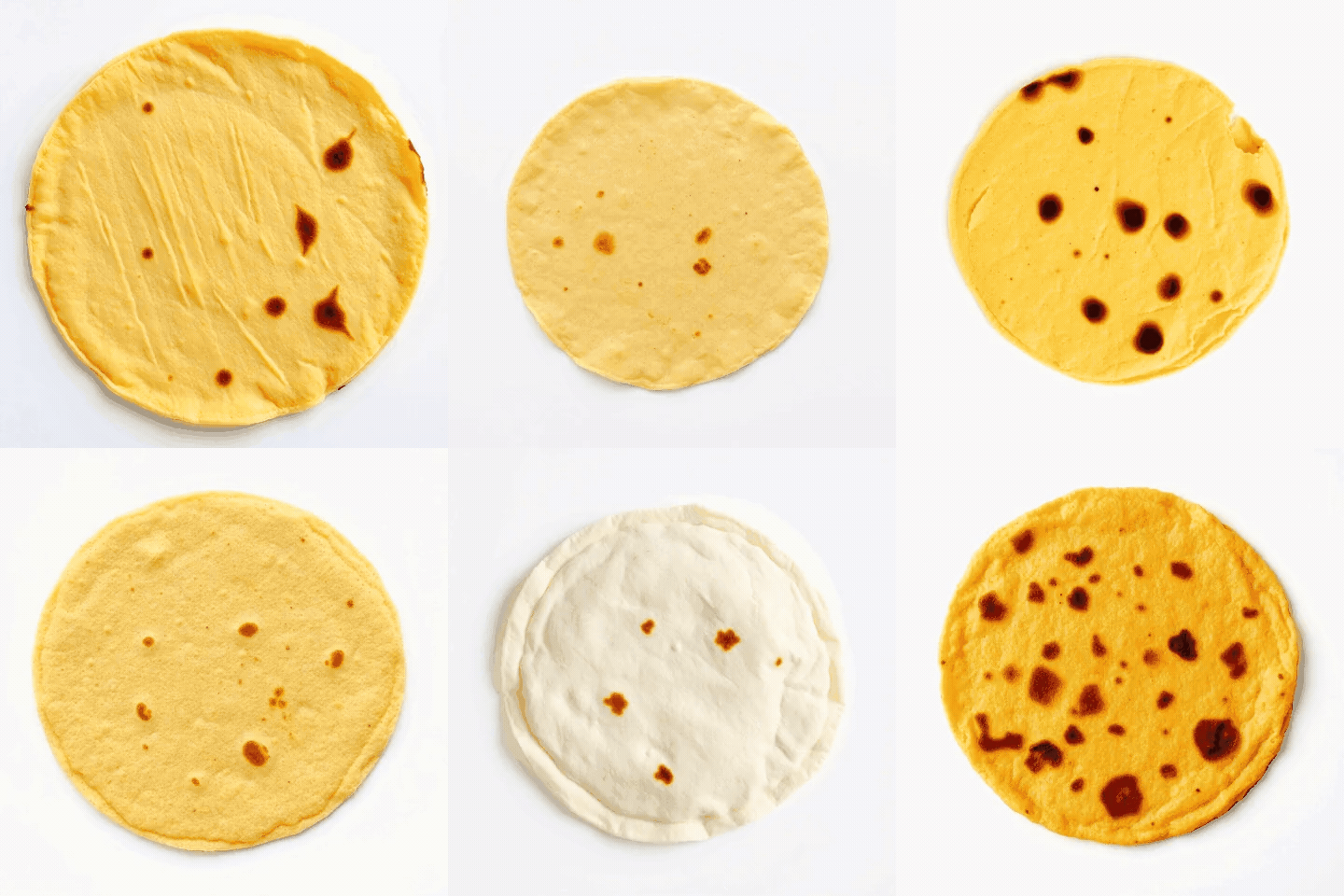
Start by generating individual product images that span whatever your spec actually cares about. For our tortilla system, that meant size, roundness, edge defects, burn marks, and holes.
AI generation lets us produce a broad library of products that would pass or fail against the customer’s specification, including the failure modes that are hardest to collect in the real world. The goal here isn’t photorealism for its own sake, it’s coverage. You want enough variety that every metric in your pipeline gets exercised.
Step 2: Simulate Potential Production Conditions
Product images alone won’t get you all the way. A system that analyzes a moving conveyor has to handle multiple cameras, image stitching, belt motion, and the same product showing up across consecutive frames.
So, the next step is composing those synthetic products into simulated conveyor footage that matches how the line looks: products laid out across lanes, traveling at a realistic belt speed, captured by adjacent cameras, etc. Simulating production conditions, along with using realistic, simulated product images, lets you test detection, cross-camera de-duplication, and frame-to-frame tracking in as realistic a development environment as possible. This lets you validate not just single-image analysis but system-level behavior.
You can take it to the next level by adding filters to your footage that match what you expect to see in production with your real camera, like hue and saturation adjustments, motion blur, digital noise, shot noise, shaking, etc.
Step 3: Drive the Entire Pipeline
With a synthetic dataset and simulated footage at your disposal, you can exercise the entire inspection workflow. You can confirm that products are isolated cleanly from the belt background, verify that tortilla size, roundness, edge defects, burn levels, and hole calculations behave as expected, tune your pass/fail boundaries against known-good and known-bad samples, and ensure the same product isn’t double-counted across cameras or frames.
The big advantage here is that you generated the inputs, so you already know the right answer. That makes silent errors, the ones that don’t crash anything but quietly produce the wrong result, much easier to catch. We went a step further with our pipeline and built a simulated camera class, which allowed us to run our test application through a full exercise before we had any production data available for testing.

Step 4: Validate Against Reality
While synthetic data can accelerate development, it can’t fully replace real-world validation. Details like contours and textures derived from simulated images, like in the case of our tortillas, will differ slightly from real production segmentation, so absolute metric values will never match perfectly. That’s fine for relative tuning and for catching logic errors, but final acceptance still requires real samples and engineer review.
For us, working through simulated data let us build out our application and get to deployment quickly, all of which brought great value to our client. It meant that we sidestepped many of the worst-case scenarios that could have happened if we deployed faulty logic into production. However, we still had to make changes to our application once we started dealing with the specific distribution of properties that the tortillas exhibited during the real inspection process. We also had to make optimizations to our pipeline that enabled our application to run on client hardware. Synthetic data took us far, but in the end, we still had to cross the finish line with real data.
Conclusion
If your machine vision project is stuck waiting on production data, synthetic data can allow you to move fast without sacrificing rigor. It clears the most common early blockers, forces you to test every metric in the pipeline, rare failure modes included, and lets you validate system-level behavior like stitching and tracking long before the line is live. Just remember to close the loop with real samples before deployment, and you get most of the speed without giving up confidence.
Have a vision system with limited data? DMC can help!
Learn more about the Test & Measurement team’s experience in vision inspection systems and how we leverage synthetic data to test against real-world scenarios.